Integrating the Christmas Ball Element into Your Holiday Design Workflow
The holiday season presents a unique set of challenges for designers, marketers, and small business owners. The demand for fresh, high-quality visual assets spikes dramatically between November and January, often outpacing the time available to create them from scratch. This is where pre-made design components, such as the Christmas Ball Element, become essential tools in a professional’s arsenal. Rather than viewing these assets as mere shortcuts, consider them foundational building blocks that streamline your creative process, ensure consistency across campaigns, and allow you to focus on higher-level strategic decisions.
Understanding how to effectively integrate a specific asset like a Christmas ornament graphic into your broader workflow requires more than just downloading a file. It involves planning for compatibility, organizing your digital library for quick retrieval, and knowing exactly which file formats serve which purpose in your production pipeline. By treating these elements as part of a structured design system, you can significantly reduce friction in your daily tasks.
Strategic Placement in the Creative Process
In any creative project, whether it is a social media campaign, a printed holiday card, or a website banner, the placement of decorative elements should be intentional. The Christmas Ball Element is not just a decoration; it is a visual anchor that can guide the viewer’s eye or balance a composition. When planning your layout, consider where this element fits best within the hierarchy of information.
During the initial brainstorming phase, you might use low-resolution placeholders to map out the general feel of the design. However, as you move into the execution phase, swapping these placeholders for high-quality vector or raster files becomes critical. The versatility of the Christmas Ball Element allows it to function in multiple roles. It can serve as a bullet point in a festive newsletter, a background texture when tiled and blurred, or a focal point in a minimalist greeting card. Recognizing these potential use cases early in the planning stage helps you avoid last-minute scrambling for suitable graphics.
Furthermore, integrating this element into your workflow before the peak holiday rush ensures that you have tested its compatibility with your existing brand guidelines. Does the color palette of the ornament align with your corporate identity? If not, can it be easily adjusted? Addressing these questions during the preparation phase, rather than during the final crunch, saves valuable time and maintains professional standards.
Understanding the File Package and Technical Specifications
To maximize the utility of any digital asset, you must understand what you are receiving and how each file type functions within different software environments. When you acquire the Christmas Ball Element package, you are provided with a comprehensive set of files designed to cover nearly every common design scenario. Knowing which file to reach for in a given situation is a key component of efficient workflow management.
The package includes the following formats:
- EPS File: Encapsulated PostScript is a vector format that is ideal for professional printing and large-scale applications. Because it is vector-based, it can be scaled to any size without losing quality. This is particularly useful for physical products like banners, posters, or merchandise where resolution is paramount.
- SVG File: Scalable Vector Graphics are optimized for web and digital interfaces. They are lightweight, load quickly, and remain crisp on high-density screens (Retina displays). Use this format for websites, email templates, and app interfaces.
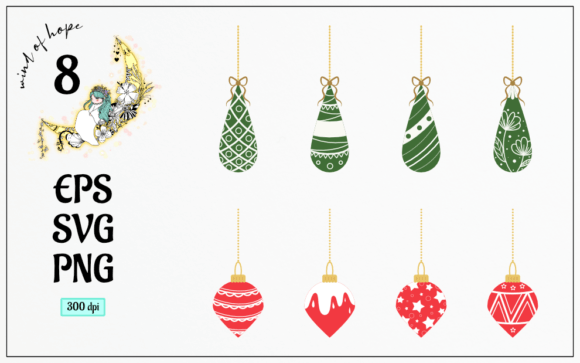
- 8 PNG Files (300dpi): These raster images feature translucent backgrounds, making them easy to layer over other designs without visible borders or white boxes. At 300 dots per inch, they are suitable for both high-quality digital display and standard printing. The variety of eight different designs allows for diversity in your layouts, preventing visual repetition.
Having access to both vector and raster formats ensures that you are never limited by the medium. Whether you are designing a tiny icon for a mobile app or a massive backdrop for a holiday event, the appropriate file is ready for immediate use. This eliminates the need to convert files manually, a process that can often introduce errors or degrade image quality.
Workflow Integration and Compatibility
Successful implementation of the Christmas Ball Element depends on how well it integrates with your existing toolset. Most modern design software, including Adobe Illustrator, Photoshop, InDesign, Canva, and various web development platforms, support these standard file types. However, the way you import and manage these files can impact your efficiency.
For vector files (EPS and SVG), it is best practice to import them directly into your design software as linked or embedded objects. In vector-based programs like Illustrator, you can ungroup the elements to modify individual components, such as changing the color of the ribbon or the shine on the ball. This level of customization is crucial for maintaining brand consistency. If your brand colors are specific hex codes, you can adjust the vector paths to match exactly, ensuring that the festive element feels like a natural part of your brand’s visual language rather than an afterthought.
For the PNG files, the translucent background is a significant time-saver. In raster-based programs like Photoshop, you can drag and drop these files directly onto your canvas. Because the background is already transparent, you do not need to spend time using magic wands or pen tools to remove unwanted pixels. This allows for rapid prototyping and iteration. You can quickly test different positions, opacities, and blending modes to see how the ornament interacts with text and other graphical elements.
When working with web developers or digital marketers, providing the SVG files ensures that the graphics remain sharp across all devices. SVGs are code-based, meaning they can be styled with CSS if necessary, offering another layer of flexibility for responsive design. This collaboration between designers and developers is smoother when the assets are delivered in universally accepted, clean formats.
Quality Control and Long-Term Asset Management
Once you have integrated the Christmas Ball Element into your current projects, consider how you will manage these assets for future use. Digital clutter can slow down your workflow, so establishing a systematic approach to file organization is essential. Create a dedicated folder in your digital asset management system for holiday resources. Within this folder, categorize files by type (vector vs. raster) and by year. This makes it easy to locate specific elements when next year’s holiday season approaches.
Quality control is another critical aspect of long-term use. Before sending any design to print or publishing it online, zoom in to 100% or more to check for pixelation or alignment issues. For the EPS and SVG files, ensure that all paths are closed and that there are no stray anchor points. For the PNGs, verify that the transparency is clean and that there are no jagged edges around the ornament. These small checks prevent costly mistakes and maintain the professional appearance of your work.
Additionally, consider how these elements can be repurposed. A Christmas ball used in a December email campaign can be tweaked slightly and reused in a New Year’s sale graphic. By slightly adjusting the color scheme or adding text overlays, you can extend the life of the asset beyond the immediate holiday window. This maximizes the return on investment for your design resources and encourages a sustainable approach to content creation.
Practical Tips for Efficient Implementation
To get the most out of the Christmas Ball Element, keep the following practical tips in mind during your design process:
- Layer Smartly: When using PNGs, place the ornament on a separate layer from your text and background. This allows you to move it around freely without affecting other elements. It also makes it easier to apply effects like drop shadows or glows specifically to the ornament.
- Maintain Consistency: If you are using multiple ornaments from the set, ensure they share a consistent lighting direction and style. Mixing realistic 3D renders with flat icons can look disjointed. Stick to one aesthetic throughout a single project.
- Optimize for Web: While the provided PNGs are high resolution, they may be too large for fast-loading websites. Consider compressing the PNGs or using the SVG versions for web projects to improve page load speeds and user experience.
- Test Print Proofs: If you are using the EPS files for print, always request a physical proof. Colors on screen can differ significantly from printed ink. Verify that the reds and greens of the Christmas ball appear vibrant and accurate on paper.
By approaching the Christmas Ball Element with a mindset focused on process, compatibility, and quality, you transform a simple graphic into a powerful tool for efficient design. It supports your workflow by reducing technical hurdles, allowing you to dedicate more energy to creativity and strategy. Whether you are a freelancer managing multiple clients or a marketer planning a seasonal campaign, these assets provide the reliability and flexibility needed to succeed in a fast-paced environment.